Your first experiment
Write an experiment for your own service: check that it is healthy, break one thing, and undo it. You need tumult from Get started.
flowchart TD
    accTitle: The parts of an experiment file
    accDescr: The steady-state hypothesis is checked first. The method breaks something. The steady state is checked again. The rollbacks undo the fault when needed.
    hyp[steady_state_hypothesis: the probes that must hold] --> method[method: the fault]
    method --> again[steady_state_hypothesis: checked again]
    again --> rb[rollbacks: undo the fault]
Start from a template
tumult templates
tumult new --from container-pause --set container=my-redis --out my-experiment.toon
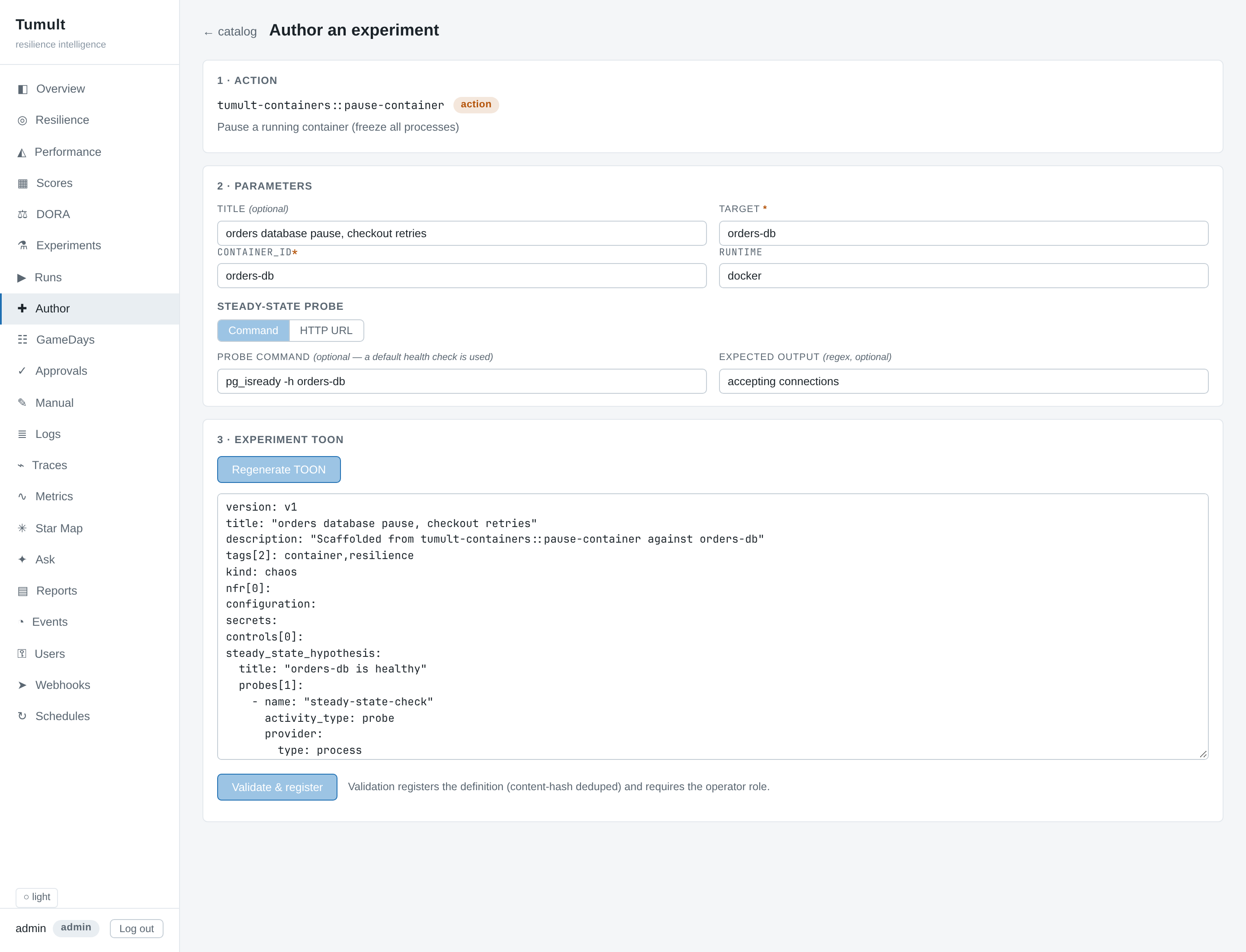
tumult templates lists the starters and their values. tumult new with no flags asks you step by step. The Author page of the web UI has the same wizard:
Or write it by hand
This file checks a health URL, stops a dependency, and starts it again.
title: My service health check
description: Verify my-service handles connection loss

steady_state_hypothesis:
  title: Service responds 200
  probes[1]:
    - name: health-check
      activity_type: probe
      provider:
        type: process
        path: curl
        arguments[6]: "-s", "-o", "/dev/null", "-w", "%{http_code}", "http://localhost:8080/health"
        timeout_s: 5.0
      tolerance:
        type: regex
        pattern: "200"

method[1]:
  - name: kill-dependency
    activity_type: action
    provider:
      type: process
      path: sh
      arguments[2]: "-c", "docker stop my-dependency-container"
      timeout_s: 10.0
    pause_after_s: 5.0

rollbacks[1]:
  - name: restart-dependency
    activity_type: action
    provider:
      type: process
      path: sh
      arguments[2]: "-c", "docker start my-dependency-container"
      timeout_s: 10.0
| Part | Here |
|---|---|
steady_state_hypothesis | The health URL answers 200, before and after. |
tolerance | What a probe must return to pass: here the text 200. |
method | Stop the dependency, then wait 5 seconds. |
rollbacks | Start the dependency again. |
Arrays carry their length: probes[1] has one item.
Check it, then run it
tumult validate my-experiment.toon         # check the file
tumult run my-experiment.toon --dry-run    # show the plan, run nothing
tumult run my-experiment.toon
tumult discover lists every action and probe you can use.
Next
- How a run works: what happens, step by step, and when the rollbacks run.
- Experiment format: every field.
- Plugins: the faults for databases, Kafka, containers, Kubernetes, the network and more.